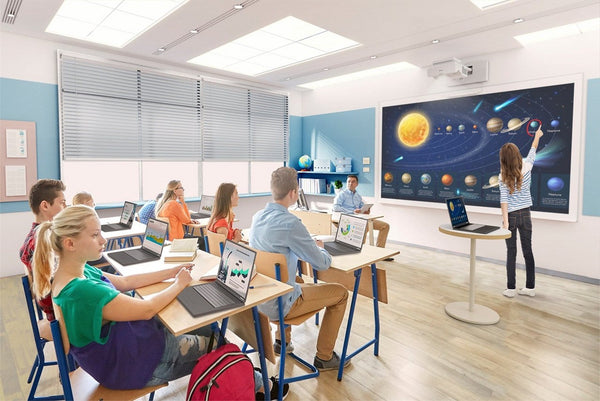
A video bar is a single bar-shaped unit that holds the camera, microphones and speakers for a meeting room, and it mounts above or below the display. It is the simplest way to turn a meeting room into a video conferencing room, because one device and one cable replace a separate camera, speakerphone and sound system.
This guide explains how to choose a video bar for offices, schools and meeting rooms in Dubai, Abu Dhabi and across the UAE. It covers the platform decision, room size, USB bars compared with standalone Android bars, camera and audio features, and what else the room needs.
Step 1: choose the meeting platform first
The platform decides which bars you can use, so settle it before comparing models. There are three common setups:
| Setup | How it works | Typical bars |
|---|---|---|
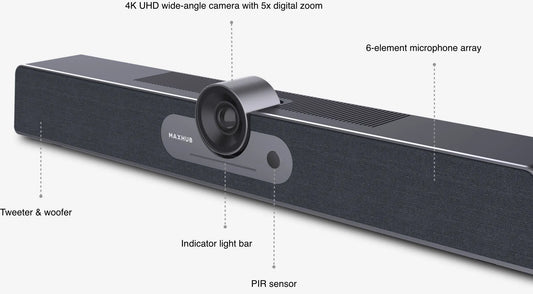
| Standalone Android bar | The bar runs the meeting app itself, so no room PC is needed. A touch console or the display controls the meeting. | Yealink MeetingBar A10, A25, A30, A40 and A50, MAXHUB XBar V70 |
| USB bar for a laptop (BYOD) | The bar connects to a laptop or room PC over USB and works with any meeting app that the laptop runs. | MAXHUB UC S07, Logitech MeetUp |
| Dual-mode bar | The same bar can run as a standalone device or as a USB camera and speaker for a laptop. | Logitech Rally Bar Mini and Rally Bar |
If the organisation uses Microsoft Teams, choose a bar that the maker lists for Teams Rooms, and read our guide to Teams Rooms, Zoom Rooms and BYOD before you decide. The product pages state which platforms each bar supports, and the platform licence is bought separately from the hardware.
Step 2: match the bar to the room
Video bars are made in sizes for small, medium and large rooms. A bar built for a small room has a wide camera and a modest microphone range, and it cannot cover a long boardroom table. Use the room use as a starting point:
| Room | What to look for | Options in this range |
|---|---|---|
| Home office, focus room, phone booth | Compact bar, wide camera, built-in speakers | Yealink MeetingBar A10 and A25 |
| Small to medium meeting room | Wide camera with auto framing, enough microphones for the table | Yealink MeetingBar A30 and A40, Logitech Rally Bar Mini, MAXHUB UC S07 |
| Medium to large meeting room | Stronger audio, more camera coverage, room for extra microphones | Yealink MeetingBar A50, Logitech Rally Bar |
The makers publish a recommended room size for each bar, so check it on the product page and treat it as the upper limit. If the room is long and narrow, or has glass walls that echo, choose the next size up or add an expansion microphone.
Small rooms and focus rooms
The Yealink MeetingBar A10 is an integrated Android conferencing bar for home offices, focus spaces and small meeting rooms, and the Yealink MeetingBar A25 is an AI video bar for focus rooms. Both suit rooms where two to four people sit close to the display.


Small and medium meeting rooms
For a standard meeting room the main choice is between two camera styles. The Yealink MeetingBar A40 uses two 48 MP camera sensors with a 120 degree diagonal field of view (110 degrees horizontal and 54 degrees vertical), supports auto framing and speaker tracking, and has two built-in 10 W rated speakers. The Yealink MeetingBar A30 is also a dual-camera Android bar for supported meeting room platforms.
The Logitech Rally Bar Mini has a motorised pan and tilt camera, 4K output, 120 degree diagonal field of view with 4X digital zoom, 6 beamforming microphones and 3 speakers. It supports two displays, and it is listed by Microsoft as a Teams Rooms on Android device. The MAXHUB UC S07 is a 4K USB bar with camera, microphone and speaker functions for computer-based meetings.


Medium to large rooms
Larger rooms need more camera coverage and more audio output. The Yealink MeetingBar A50 is an Android video bar with a triple-camera system and microphone array for hybrid meetings, and the Logitech Rally Bar is a video bar for medium to large rooms that Logitech certifies for Microsoft Teams, Zoom and Google Meet. For the biggest rooms, a bar is often not enough, and a modular room kit with a separate camera and ceiling microphones is the better answer. See our video conferencing kits.


Step 3: compare the features that matter
- Camera framing: auto framing keeps everyone in view as people sit down or move. Speaker tracking and dual cameras, as in the Yealink MeetingBar A40, help in rooms where people sit at different distances.
- Field of view: a wider angle shows more of the table, but the people at the edges look smaller. Compare the published angle with the width of your room.
- Microphones and speakers: beamforming microphones pick up voices across the table and reduce room noise. Check the published pickup range against the table length.
- Resolution: the sensor resolution is not the same as the resolution sent into the meeting, which depends on the platform and the selected mode.
- Displays: some bars drive one display and some two. The Logitech Rally Bar Mini supports two displays.
- Control: choose a bar that comes with, or works with, a touch controller if you want one-tap join. See our meeting room control guide.
Step 4: check what the room still needs
A video bar solves the camera and the audio for a small or medium room, but the room still needs a few things:
- A display: the bar sits on or under a commercial display, so size the screen to the room. Browse interactive panels and commercial displays.
- A mount or stand: choose a VSYS wall mount or floor stand rated for the display size and weight, from the VSYS mounting range. Check that the bar mounting position clears the display bezel.
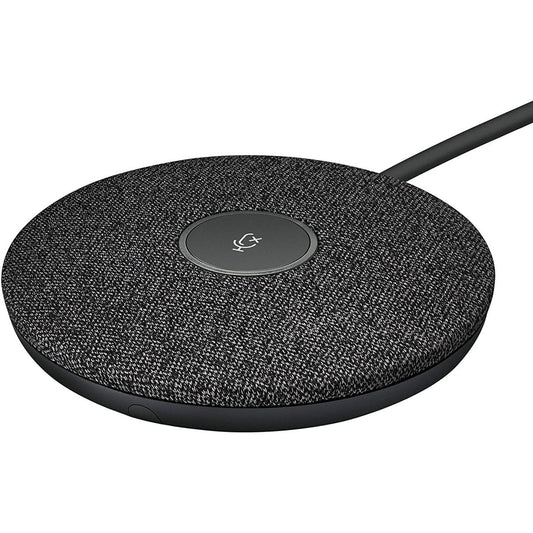
- Extra microphones: a long table may need an expansion microphone, such as the Logitech Rally Mic Pod, or ceiling microphones from our ceiling microphone range.
- Wireless sharing: add a presentation system so guests can share without cables. See wireless presentation systems.
- Network: a video bar needs a wired network port with enough bandwidth, and many bars can be powered over PoE.


Common mistakes to avoid
- Choosing the bar before the platform: a bar that is not listed for your platform may not support the room controls.
- Too small a bar for the room: people at the far end of the table are not heard or framed well.
- Display too small: remote faces and shared content become hard to read from the back row.
- Bar behind glass or in a cabinet: the camera and microphones need a clear view and open air.
- Forgetting the room acoustics: hard walls and glass add echo that no bar can remove completely.
- No cable plan: plan the network, power and HDMI runs to the display before you mount.
Key terms explained
- Video bar: one unit with a camera, microphones and speakers.
- Android bar (appliance): a bar that runs the meeting app by itself, with no room PC.
- USB bar: a bar that works as a camera and speaker for a laptop or room PC.
- Auto framing: the camera zooms and moves to keep everyone in the shot.
- Field of view: the angle the camera can see, in degrees.
- Beamforming microphones: microphones that focus on voices and reduce room noise.
- PoE: power over Ethernet, one network cable for power and data.
Get the right video bar for your room
CorporateAV.ae supplies and installs video bars across the UAE, and is an authorised dealer of Yealink, Logitech and MAXHUB. Browse the full range in video bars and all-in-one systems, see our Microsoft Teams Rooms solutions, or send us your room size and display and we will recommend and quote the right bar.